Webflow vs Sitecore: Enterprise CMS Comparison Guide [2026]

Let's Build Your Webflow Website!
Partner with experts who understand your vision. Let’s create a converting user experience and build your website for future growth.
Webflow vs Sitecore: Enterprise CMS Comparison Guide
Webflow is a visual development platform designed for marketing teams that need speed, design flexibility, and autonomy, with plans ranging from $23 to $212/month. Sitecore is an enterprise Digital Experience Platform (DXP) built for organizations that need advanced personalization, multilingual content, and omnichannel delivery, with licensing typically starting at around $40,000-$80,000 per year. The right choice depends on your organization's complexity, budget, and who owns the website.
ABSTRACT
Enterprise teams evaluating CMS platforms in 2026 face a shifting landscape. Composable architecture, SaaS DXPs, and growing pressure for marketing team autonomy are driving many organizations to reassess legacy platforms. At the same time, migration from complex systems like Sitecore to faster, more flexible digital platforms is increasing. This guide compares Webflow and Sitecore across features, cost, implementation timelines, and organizational fit to help enterprise decision-makers determine the right platform.
Quick-Reference Comparison Table
Overview of Webflow and Sitecore
Introduction to Webflow

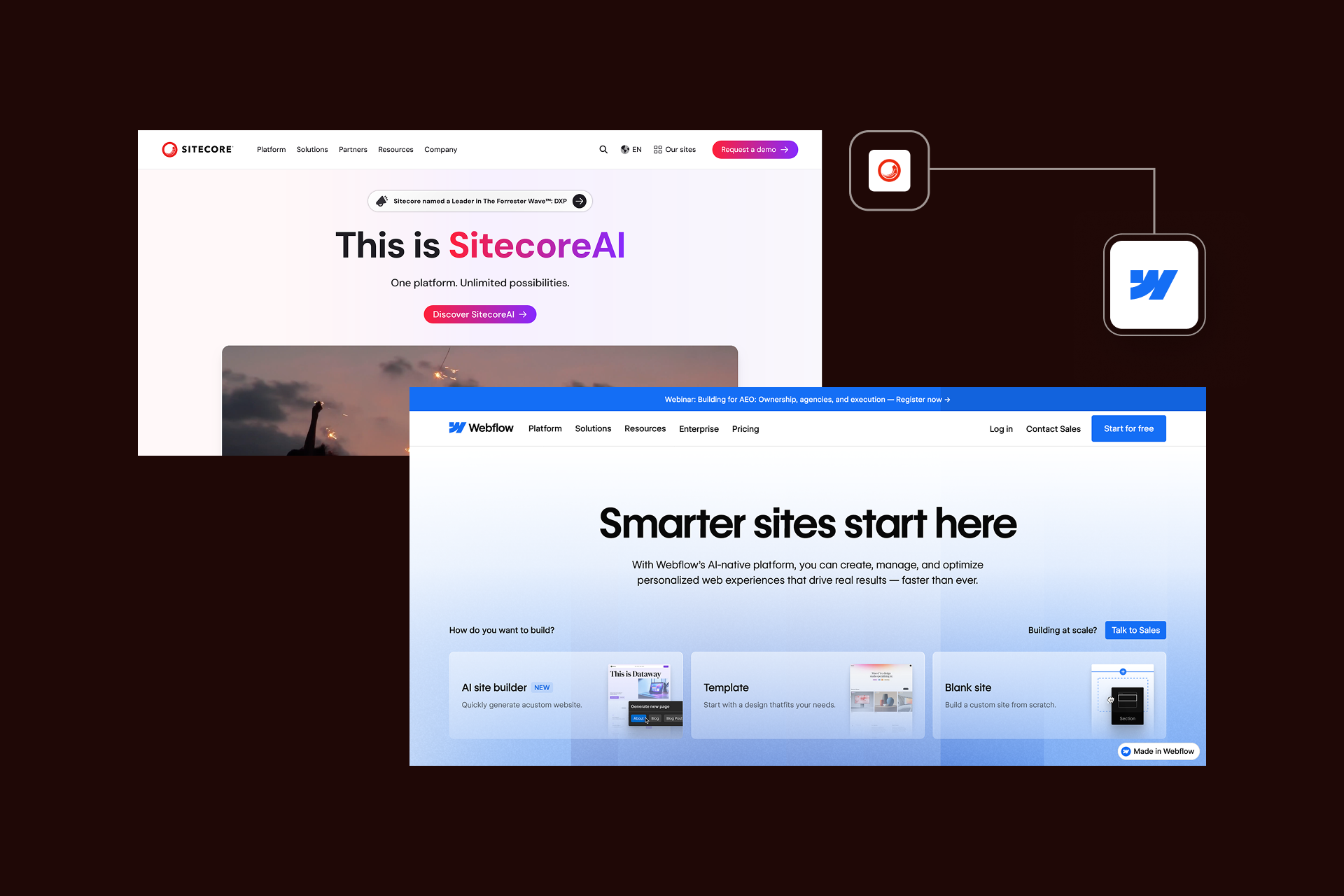
Webflow is a visual development platform that allows teams to build custom no-code websites. It helps designers and marketing teams create professional, production-ready websites using a visual interface that outputs clean HTML, CSS, and JavaScript. This approach means far less dependence on engineering teams for routine website changes.
The platform is commonly used by designers, marketing teams, and digital agencies to build marketing websites, product pages, and campaign landing pages. Its strengths include design flexibility, fast iteration, and built-in hosting delivered through a global CDN. Your teams can launch and update pages quickly without relying on development sprints.
Larger organizations can rely on Webflow Enterprise, which adds features such as SSO, audit logs, service-level agreements, and SOC 2 Type II compliance, which is typically required for enterprise security standards. These capabilities have helped drive adoption among larger organizations. Companies including Lattice, Dell, and Rakuten use Webflow to power marketing properties and reduce reliance on developer-heavy CMS workflows.
Organizations that evaluate enterprise Webflow development often adopt the platform to give marketing teams greater control over site updates and campaign launches while maintaining governance and performance standards.
Introduction to Sitecore

Sitecore operates in a different category. Rather than focusing solely on web content management, it’s designed as a Digital Experience Platform (DXP) built for large organizations that manage complex digital ecosystems.
Sitecore is commonly used by global enterprises, Fortune 500 companies, and organizations managing multi-region digital experiences. Its core strengths lie in personalization, advanced analytics, and omnichannel orchestration. The platform enables businesses to deliver tailored experiences across websites, apps, email, and customer touchpoints.
Historically, Sitecore deployments were on-premise and heavily customized, which often required specialized .NET development teams. In response to industry shifts toward SaaS and composable architectures, Sitecore introduced Sitecore XM Cloud in 2022, its cloud-native CMS designed to modernize deployments and reduce infrastructure overhead, according to official Sitecore product documentation.
The broader Sitecore ecosystem follows a composable DXP model, combining products such as XM Cloud, Customer Data Platform (CDP), Personalize, and Content Hub. This modular approach allows enterprises to build complex digital experience stacks, but it usually requires deeper implementation work and ongoing technical management.
Key Differences in Purpose and Use Cases
The clearest distinction between Webflow and Sitecore lies in who manages the website and how complex the digital experience needs to be.
Webflow prioritizes design flexibility, speed to market, and marketing team autonomy. It is commonly used for marketing websites, product launches, content hubs, and landing pages where rapid iteration and visual control are important.
Sitecore, by contrast, is designed for enterprise-scale digital ecosystems. Organizations often deploy it when they require advanced personalization, multilingual content management, and tightly integrated customer data across multiple channels.
The difference shapes the teams involved. Webflow environments are typically managed by marketing and design teams, sometimes with light developer support. Sitecore implementations are usually IT-led, requiring developers and architects to maintain integrations, infrastructure, and complex workflows.
As a result, many organizations evaluate the platforms not just on features, but on team structure, technical resources, and the complexity of their digital estate.
For a broader comparison of modern CMS approaches, check out our Webflow vs WordPress comparison.
Platform Positioning Matrix
Axes:
- X-axis: Site Complexity (Simple → Complex)
- Y-axis: Team Technical Capability (Marketing-Led → IT-Led)
Overlay Elements:
- Webflow zone: Covers bottom half and extends into complex/marketing
- Sitecore zone: Covers top-right complex/IT quadrant
- Overlap zone: Complex marketing sites (both can work)
Key Insight Callout: "The decision often comes down to: Who owns the website day-to-day? If marketing needs autonomy, lean Webflow. If IT drives the site and complexity is high, consider Sitecore."
Webflow vs Sitecore: Feature Comparison
Choosing between Webflow and Sitecore ultimately comes down to the capabilities your organization needs, as well as how those capabilities are delivered. Both platforms are powerful, but they prioritize different strengths.
Webflow focuses on design agility and marketing team autonomy, while Sitecore emphasizes enterprise-scale personalization, governance, and integration flexibility.
Design Flexibility and Control
Webflow is built around a visual development canvas that gives designers direct control over layout, styling, and interactions, while still producing clean HTML, CSS, and JavaScript. Instead of relying on rigid templates, teams can design pages visually while maintaining granular control over responsive behavior, animations, and layout structure.
This design-first approach allows marketing teams and designers to build and iterate on pages quickly. New landing pages, campaign hubs, or design updates can often be implemented in hours as opposed to days or weeks.
Sitecore follows a more traditional enterprise CMS approach. Most customization work happens through templates and components created by developers. While this model gives consistency and governance, it also means that design changes will often require .NET developers to update templates or components.
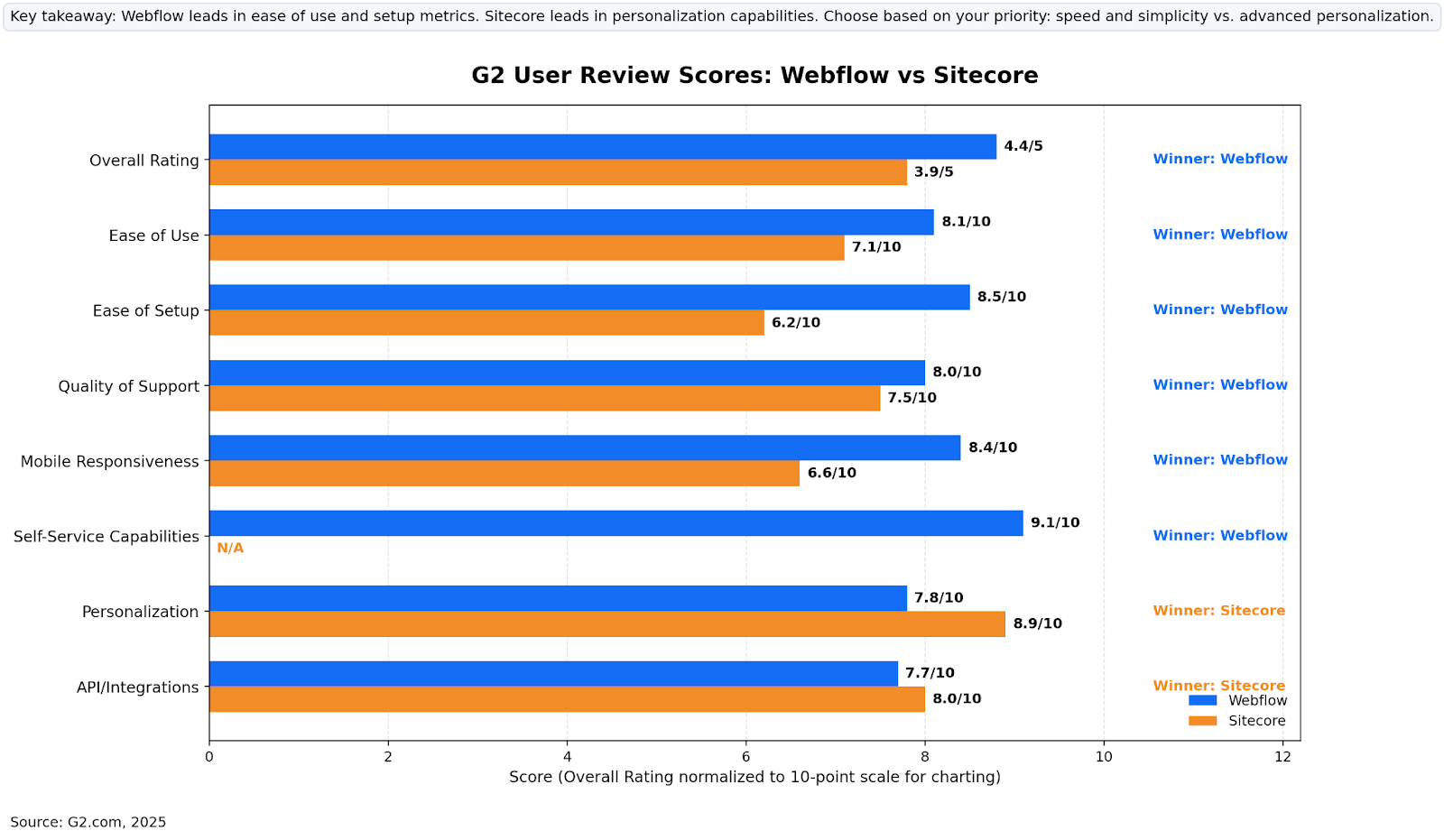
These differences also show up in third-party user reviews. On G2, Webflow scores 8.1 for ease of use, while Sitecore clocks 7.1. That gap highlights how much more accessible Webflow is for non-developers.
For organizations that need design teams to launch campaigns quickly and iterate on messaging, the difference in speed can be considerable. Teams using Webflow can typically deploy new designs the same day, while Sitecore changes may require development cycles and deployment pipelines.
You can see examples of our design-driven builds by checking out the Shadow Digital portfolio, which showcases our enterprise Webflow projects across SaaS, fintech, and B2B organizations.
Content Management and Editing Experience
Content management is another area where the platforms differ significantly.
Webflow’s CMS uses custom collections and a visual editor, allowing content teams to create structured content such as blog posts, landing pages, and case studies without engineering support. Editors can update content directly on the live page through the Webflow Editor interface, making it easier for marketing teams to maintain site content without developer queues.
Sitecore also provides a powerful editing environment. With the Pages editor in XM Cloud, content teams can edit pages using a WYSIWYG interface while maintaining structured workflows. The platform excels in environments where governance is critical. Large teams can implement approval workflows, version control, and granular permissions to ensure content changes follow internal processes.
The trade-off is complexity. While Sitecore offers extensive governance features, it can also require more configuration and training before teams can fully manage content independently.
Scalability and Performance
Both platforms support enterprise-scale websites, but they achieve scalability in different ways. Webflow uses a global CDN infrastructure powered by providers like AWS and Cloudflare. Hosting, caching, and performance optimization are handled automatically, freeing your team to focus on design and content, as opposed to infrastructure management.
Many organizations migrating from legacy platforms report improvements in performance after migrating to Webflow. Migration case studies from agencies like Flowtrix suggest that Webflow sites can load 3-5x faster post-migration, largely due to optimized hosting architecture and cleaner code output.
Webflow does have certain CMS scale limits on standard plans. The Business plan supports 10,000 CMS items, though Enterprise plans can support larger datasets.
Sitecore, by contrast, is designed for massive enterprise content ecosystems. Its architecture supports multi-region deployments, large content repositories, and complex multi-site environments. Organizations running dozens or even hundreds of digital properties often rely on Sitecore for that level of scale.
In G2 reviews, Webflow also scores higher for mobile responsiveness, with an 8.4 rating compared with Sitecore’s 6.6, reflecting its design-first architecture.
Personalization and Marketing Tools
Personalization is one of the key areas where Sitecore is a market leader.
That is because the Sitecore ecosystem includes tools such as its Customer Data Platform and personalization engine, which allow businesses to tailor experiences based on behavioral data, customer segments, and cross-channel activity. This enables real-time personalization across websites, apps, and marketing channels.
According to G2 ratings, Sitecore scores an impressive 8.9 for personalization, dwarfing Webflow’s 7.8. Webflow has expanded its marketing capabilities through Webflow Optimize, an add-on that supports A/B testing and basic personalization features starting at around $299 per month. These capabilities allow teams to test page variations, optimize conversions, and tailor experiences to audience segments.
Organizations that require deep behavioral personalization or omnichannel orchestration will likely find Sitecore better suited to those needs. The platform’s personalization stack is designed for enterprises managing complex customer journeys across multiple touchpoints.
G2 User Review Scores: Webflow vs Sitecore
SEO and Ecommerce Capabilities
Both platforms offer strong SEO capabilities, but they approach them differently.
Webflow generates clean semantic HTML and includes native SEO tools such as automatic sitemap generation, customizable meta tags, structured data support, and straightforward URL management. Because designers work directly within the visual canvas, technical SEO elements can often be implemented without the need for developer assistance.
Sitecore also supports enterprise SEO strategies, but the platform typically requires more configuration and development work to implement advanced SEO controls.
When it comes to ecommerce, Webflow includes built-in functionality that supports up to 15,000 products on its Advanced plan. This makes it suitable for mid-market ecommerce sites and content-driven storefronts.
Sitecore’s commerce capabilities are built for larger enterprise ecommerce environments. Sitecore Commerce supports complex product catalogs, advanced pricing models, and deep integration with enterprise systems such as ERP platforms and CRM software.
Integration and Developer Dependency
Enterprise websites rarely operate in isolation. Integration with marketing tools, CRM systems, and analytics platforms is essential. Webflow supports these integrations through native connectors, tools such as Zapier, and APIs that connect external systems together. This means marketing teams can implement many integrations without engineering support.
Sitecore offers extremely powerful integration capabilities via its APIs and extensibility framework. Enterprises can connect the platform with internal systems and marketing automation tools.
The difference lies in the level of developer dependency. Sitecore environments require experienced .NET developers to implement and maintain integrations. In many enterprise environments, these specialists command hourly rates that range from $150 to $250.
By contrast, Webflow allows marketing teams to manage many updates independently. This advantage is reflected in G2 ratings, where Webflow scores an impressive 9.1 for self-service capabilities.
For organizations looking to remove bottlenecks and empower their marketing teams, this independence can significantly accelerate content updates and campaign launches.
Feature Comparison Matrix
Business Consideration and Decision Factors
Beyond features and design capabilities, enterprise leaders evaluating Webflow and Sitecore must also consider the broader business impact of each platform. Pricing models, implementation timelines, and operational complexity all help determine which CMS will deliver the most value.
Pricing Structure and Total Cost of Ownership
At surface level, Webflow and Sitecore have very different pricing models. Webflow provides straightforward subscription plans, with the following tiers:
- Basic plan - $14 per month
- CMS plan - $23 per month
- Business plan - $49 per month
- Enterprise plan - custom
Sitecore, on the other hand, operates very differently when it comes to pricing. Licensing for enterprise deployments typically falls into two broad categories:
- Licensing for enterprise deployments starts between $40,000-$80,000 per year
- Mid-size Sitecore projects range from $140,000-$320,000
Operational costs also matter. Sitecore environments typically require ongoing maintenance, often equal to 10-20% of the annual licensing costs to cover upgrades. Enterprises also need to use specialized .NET developers to maintain integrations and develop new features.
Research from Vendr suggests that the average Sitecore annual costs is approximately $71,888, excluding many customization and infrastructure expenses.
When organizations evaluate total cost over a five-year period, the disparities become more obvious. Implementation costs, developer dependency, and infrastructure management can dramatically increase total cost of ownership for complex enterprise CMS deployments.
TCO Comparison Table
Hidden Costs to Consider
This five-year model typically shows that Webflow deployments can cost hundreds of thousands of dollars less than comparable Sitecore implementations, particularly when factoring in developer costs, infrastructure management, and ongoing maintenance.
Implementation Timeline and Learning Curve
Another major factor in CMS evaluation is implementation speed. For marketing-driven companies, being able to launch new sites and campaigns quickly can have a direct impact on revenue and customer acquisition.
Webflow projects tend to take between two and eight weeks to launch for the majority of marketing websites. The platform combines design tools, CMS functionality, and hosting infrastructure in a single environment, and teams are able to move from design to production as fast as possible.
Sitecore deployments are far more complex, with Enterprise-grade implementations often needing as much as 6-12 months for planning, development, and integration. These projects tend to involve custom development, infrastructure configuration, and extensive testing prior to launch time.
User feedback via G2.com comparison gives Webflow a score of 8.5 for ease of setup, which considerably dwarfs Sitecore’s 6.2.
It’s important to note that training timelines can also vary. Marketing teams can often learn Webflow in a matter of weeks, or even days, while Sitecore implementations tend to require months of onboarding for developers, content editors, and administrators.
Businesses that operate in fast-moving markets, and this is a difference that can impact how quickly teams are able to launch campaigns, while experimenting with messaging, and responding to the evolution of customer behavior.
Implementation Timeline Comparison
Webflow Enterprise Project (8-12 weeks)
Sitecore XM Cloud Project (8-12 weeks)
Key Differentiators
Customization and Enterprise Features
Both of the platforms are able to support enterprise functionality, but differ considerably in their approach to customization.
Sitecore excels in environments where extreme scale and deep personalization are necessary, and integration with large enterprise systems mean Sitecore is a strong fit for organizations with complicated digital ecosystems.
Webflow, conversely, is well optimized for marketing agility and flexible design. The platform allows marketing teams to build and develop landing pages, product pages, and campaign sites quickly and efficiently, without relying on engineering teams too heavily.
Organizations that prioritize design flexibility and faster campaign deployment tend to find Webflow to be the most efficient platform for marketing websites. It’s also common to adopt hybrid architectures that combine the strengths of both platforms. This results in Webflow powering the marketing website, while Sitecore continues to manage complex applications.
For examples of enterprise Webflow implementations, see the Shadow Digital portfolio.
Maintenance and Hosting
Operational complexity is another of the big differences between Webflow and Sitecore.
With Webflow, fully managed hosting is provided as part of the platform. Websites are delivered via a global CDN, SSL certificates are included by default, and updates to the platform infrastructure happen instantly and automatically. This helps to reduce operational overhead for your internal teams.
Webflow Enterprise environments are crucial for meeting modern security requirements, including SOC 2 Type II compliance.
Sitecore environments, conversely, require more maintenance long-term. Organizations may run Sitecore in managed cloud environments or host it within their own infrastructure. Either way, teams are going to need to handle security patches and infrastructure monitoring.
This is a difference that can result in increased complexity and operational cost. Webflow’s all-in-one architecture minimizes the need for ongoing infrastructure management, while Sitecore environments often require specific operational support.
Target Users: Marketing Teams vs Developers
Determining which CMS is the right fit for your organization is crucial for working toward long-term success, and developing a leading business website.
Webflow’s strongest USP is the fact that it empowers marketing and design teams to push themselves, get creative, and think outside the box. Its visual development interface makes it straightforward and user-friendly for non-developers who want to build pages, update content, and launch campaigns with no coding knowledge or reliance on engineering.
This can help reduce the risk of internal bottlenecks. User reviews on G2 rated Webflow a 9.1 for its self-service capabilities, illustrating how easy it is for teams to use and manage their own websites.
Sitecore environments tend to be more IT-driven, and the platform’s architecture is reliant on specialized development teams to manage their infrastructure, build templates, and maintain integrations.
Developer availability is also a key part of this, with experienced .NET developers commanding higher hourly rates than JavaScript-focused developers. Organizations evaluating Enterprise Webflow development tend to do so because they want marketing teams to take greater ownership of the website, to reduce long development cycles.
Platform Strengths and Limitations Summary
Each platform has clear advantages that depend on the needs and requirements of the organizations.
Webflow’s strengths include flexible design, speed, predictable pricing, and marketing autonomy. These are some of the key factors that are so effective for campaign landing pages, marketing websites, and content-driven experiences.
The limitations of the platform primarily relate to scale and enterprise functionality. Organizations that require huge volumes of content, deeply personal customer journeys, or complex enterprise integrations might face constraints.
Incidentally, Sitecore excels in these very areas, providing strong personalization, enterprise-level integrations, and support for complex digital frameworks.
But, there are trade-offs, such as higher licensing costs, longer timescales for implementation, and a reliance on specialized development teams, which can wind up slowing down marketing execution and operational complexity.
Decision Framework Matrix
Choose Webflow when:
Choose Sitecore when:
Hybrid approach scenarios:
Decision Flowchart
START
│
▼
Do you need advanced personalization across sessions?
│
├── YES → Consider Sitecore
│
└── NO → Continue
│
▼
Is your IT team driving the website?
│
├── YES → Sitecore may fit culture
│
└── NO → Continue
│
▼
Is budget a major constraint?
│
├── YES → Webflow
│
└── NO → Continue
│
▼
Do you need 50+ sites with complex governance?
│
├── YES → Sitecore
│
└── NO → Webflow
Migration Considerations
As more businesses continue to reassess legacy CMS platforms, migrating from Sitecore to Webflow has become a common choice. Organizations tend to explore migration when looking to reduce the cost of ownership, accelerating site launches, and providing marketing teams with control over website updates.
One of the leading ways that facilitates this is operational efficiency. Webflow empowers marketing teams to build and update their pages without having to rely on development teams. This is essential for reducing campaign turnaround time, and can also help to improve marketing agility.
But, migration from Sitecore is not as simple as just moving content from one platform to another. A lot of enterprise Sitecore environments contain years of customizations, integrations, and functionalities that need to be carefully evaluated during the migration process. Content structures, URL mappings, and SEO signals need to be preserved to avoid the disruption of organic search performances.
However, it is worth noting that not all Sitecore components can or will migrate. Things like marketing websites, campaign landing pages, and content hubs are typically fine, and will transition well to Webflow. This is largely because they benefit from greater design flexibility, and quicker publishing workflows.
More complex systems will typically remain on Sitecore, and things like enterprise portals, customer dashboards, or applications that need deep integrations tend to require Sitecore’s more advanced infrastructure.
As such, a lot of businesses choose to adopt hybrid architecture, which allows Webflow to power the marketing website while Sitecore takes care of the more complex applications and customer experiences.
Mid-sized Sitecore-to-Webflow site migrations take around 8-16 weeks, but it depends on the size and complexity of the site and its content. Companies that evaluate migration strategies typically wind up exploring bespoke Webflow migration services to assess the fit for their business.
If you want to evaluate whether Webflow migration services are right for your organization, you can contact for enterprise assessment to review architecture, content complexity, and migration readiness.
[Migration Readiness Checklist]
Site Assessment
Technical Requirements
Organizational Readiness
Red Flags (Consider Staying on Sitecore)
Migration Scoring
FAQs
Q1. Is Webflow better than Sitecore?
This depends a lot on what your business needs. Webflow excels for enterprises focused on speed, flexible design, and marketing autonomy, while Sitecore is better for advanced personalization and complex digital experiences.
Q2. Can Weflow handle enterprise websites?
Yes. Webflow supports enterprise websites via its Webflow Enterprise features, including scalable hosting and SSO.
Q3. Is Sitecore worth the cost?
Sitecore can certainly be worthwhile for large enterprise businesses reliant on omnichannel experiences and deep system integrations, but might be overkill for simple marketing websites.
Q4. What is the main difference between Webflow and Sitecore?
The core difference is that Webflow is a visual platform focused on marketing agility and design control, while Sitecore is designed for complex digital ecosystems.
Pricing Questions
Q5. How much does Sitecore cost per year?
Sitecore licensing can set you back between $40,000 and $80,000 per year, and costs can increase considerably when you factor in implementation and development too.
Q6. How much does Webflow Enterprise cost?
Webflow Enterprise uses custom pricing based on the scale of your project, but organizations can typically spend tens of thousands.
Q7. What is the total cost of ownership for Sitecore?
Total cost of ownership for Sitecore varies, and typically includes licensing, implementation, infrastructure, upgrades, and maintenance, which can total hundreds of thousands of dollars.
Migration Questions:
Q8. Can you migrate from Sitecore to Webflow?
Yes. It’s common for many organizations to migrate from Sitecore to Webflow, especially when moving marketing websites, and seeking a faster platform.
Q9. How long does a Sitecore to Webflow migration take?
Sitecore-to-Webflow migration timelines depend on the scale of the project, but it takes approximately between 8-16 weeks to complete.
Q10. Will I lose SEO if I migrate from Sitecore to Webflow?
Not necessarily. While this is certainly a risk, it is, in fact, possible to preserve your SEO performance during the Sitecore to Webflow migration process, provided you maintain metadata, content architecture and URL structures.
Technical Questions
Q11. Does Webflow have personalization like Sitecore?
Webflow operates differently to Sitecore, providing basic optimization and personalization. On the other hand, Sitecore is the better choice for advanced personalization due to its DXP ecosystem.
Q12. What is Sitecore XM Cloud and how does it compare to Webflow?
Sitecore XM Cloud is Sitecore’s cloud-native CMS that exists within its DXP architecture. Webflow, conversely, is focused more on visual development and marketing autonomy.
Schema Markup Template:
{
"@context": "https://schema.org",
"@type": "FAQPage",
"mainEntity": [{
"@type": "Question",
"name": "Is Webflow better than Sitecore?",
"acceptedAnswer": {
"@type": "Answer",
"text": "Answer text here..."
}
}]
}
Final Recommendation and Next Steps
Choosing between Webflow and Sitecore comes down to what your budget is, what your business needs, and how complex your site requirements are.
If speed, flexibility, autonomy, and lower cost are important to you, Webflow is typically a stronger fit. If your focus is more on personalization, complex integrations, and large-scale omnichannel orchestration, Sitecore is certainly the preferred choice.
For a lot of businesses, some form of hybrid planning or integration is likely to be the best approach. Shadow Digital specializes in enterprise Webflow development and Sitecore-to-Webflow migrations, helping your business to evaluate fit, reduce complexity, and accelerate digital execution.
Ready to Make Your Decision?
Headline: "The right CMS depends on your organization's complexity, team structure, and growth trajectory."
Supporting Copy: Shadow Digital helps enterprises evaluate, migrate, and build on Webflow. Our team has delivered 100+ enterprise Webflow projects and completed migrations from Sitecore, WordPress, and legacy platforms.
CTA Layout: